Tour
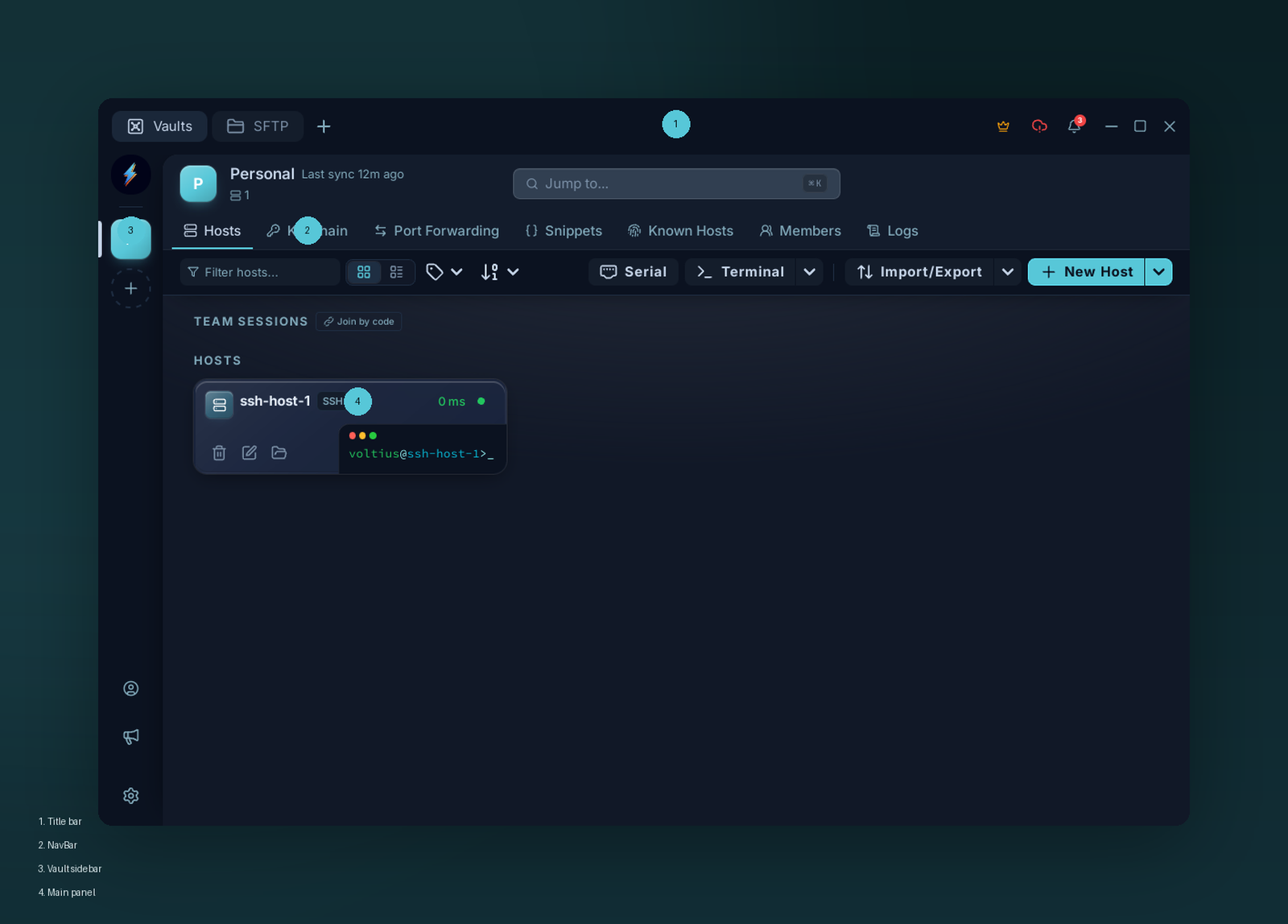
The four regions of the window: title bar, NavBar, vault sidebar, and main panel.
Four regions:
Title bar — custom (system one is hidden). Holds the omnibar in the middle. Drag anywhere blank to move the window.
Top NavBar — feature tabs:
| Tab | What |
|---|---|
| Hosts | Browse and connect |
| Keychain | SSH keys + identities |
| Port Forwarding | SSH tunnels |
| Snippets | Reusable commands |
| Known Hosts | Pinned fingerprints |
| Members | (Teams) team members |
| Logs | (Teams) audit log |
Vault sidebar — encrypted stores. Personal by default; Teams adds shared vaults. Click a vault to scope the main panel.
Main panel — list + toolbar + side panel that slides in when you select an item.
Terminal tabs
Open a session and a tab strip appears along the top. Tabs split horizontally or vertically and can broadcast keystrokes — see Split panes.
Command palette
Ctrl+K / Cmd+K from anywhere. Connect by host name, run snippets, jump to settings. See Command palette.
Settings
Bottom of the vault sidebar → account button → Settings.