Local network sync
Devices signed into the same Voltius account sync directly with each other when they are on the same network. Devices without an account can do the same after a one-time pairing. No Voltius server sits in the path, and it works without internet: two laptops on a home Wi-Fi with the router's uplink down still stay in step.
Local network sync is free on every plan, including free accounts, and it is on by default. There is nothing to set up.
What syncs
The same data as Cloud sync, for your Personal vault and any other private vaults you created:
- Hosts, folders, tags
- Identities, SSH keys
- Snippets, port-forwarding rules
- Synced app preferences
The same exclusions apply: anything you turned off in Settings → Sync, and device-specific settings such as the window layout, stay on the device.
Team vaults are not included. Team vaults live on the Voltius server and are only fetched while you are online, so there is nothing on the device to hand to a nearby one.
How it works
- Each device announces "a Voltius is here" on the local network over mDNS. The announcement carries a random name that changes every 15 minutes and nothing else: no device name, no account, no stable identifier.
- When two devices find each other, they prove they hold the same account's vault key without sending it. A device that cannot prove it gets the handshake and nothing more, so another person's Voltius on a café or office network never sees your data, and you never see theirs.
- The devices then exchange their sync data inside an encrypted channel. The data itself is still encrypted with your vault key, exactly as it is for Cloud sync, and merged the same way.
- While they stay in reach, every change you make is pushed to the other device within a second or two.
Local network sync runs alongside Cloud sync and any sync provider plugin. A change that arrives by two routes is merged once.
The sync menu
The title-bar sync menu has a Local network section:
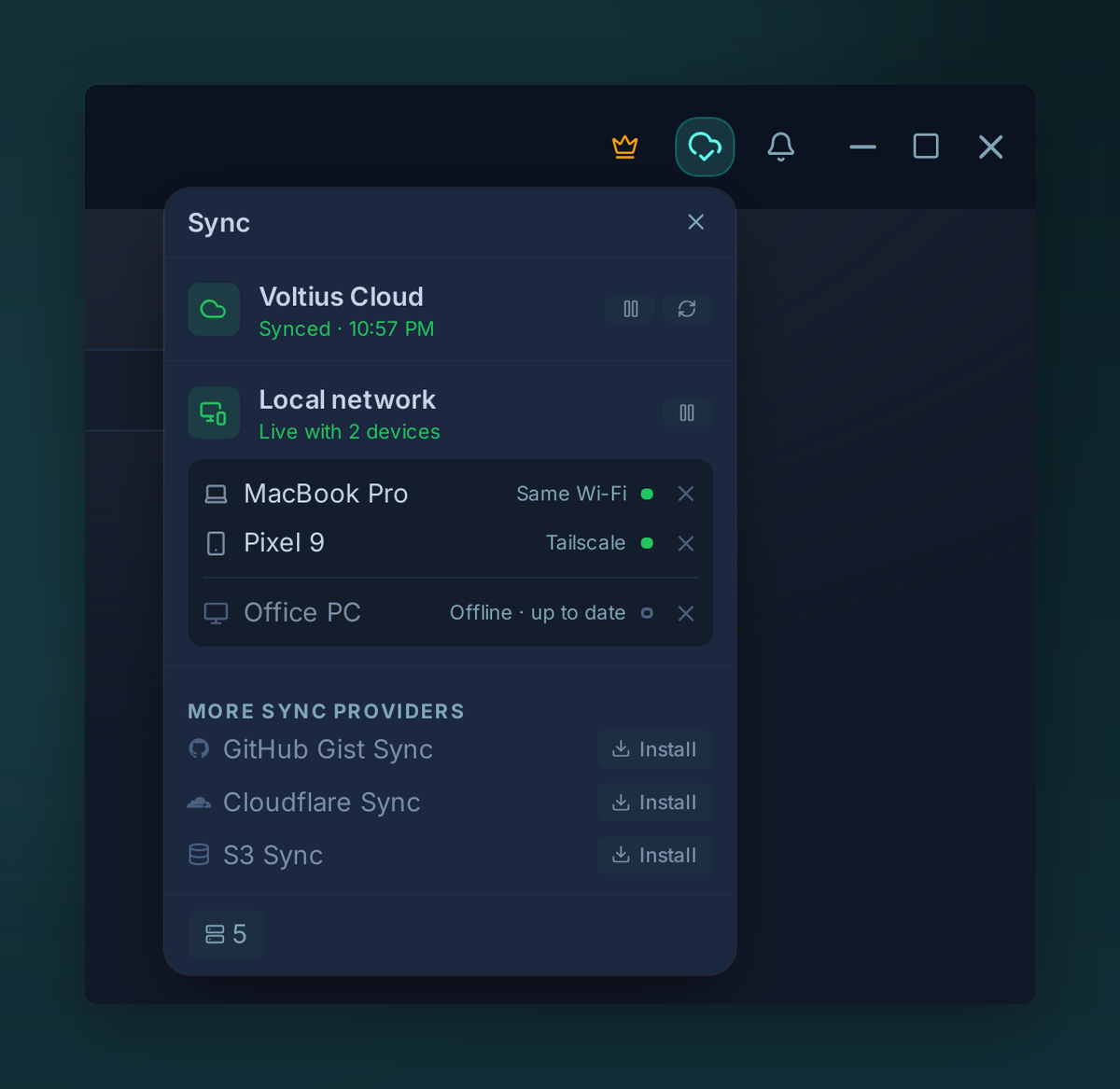
| Status line | Meaning |
|---|---|
| Live with 2 devices | Nearby devices are connected and up to date |
| Syncing with device… | Catching up with a device right now |
| No devices nearby | Nothing on this network, other devices are listed below as offline |
| Local sync paused | You paused it |
Below the status line, every device you own is listed, nearby ones first:
| Right-hand text | Meaning |
|---|---|
| Same Wi-Fi | On this network and up to date |
| Syncing 12 changes | Catching up now |
| Offline · 3 changes behind | Out of reach, and missing changes made here |
| Offline · up to date | Out of reach, nothing missing |
An offline device that is behind gets your changes the next time it is on the same network as one of your other devices. If you want devices to stay in sync when they are never online together, that is what Cloud sync is for.
When a nearby device is connected and Cloud sync is offline or not set up, the title-bar sync icon becomes a green Wi-Fi icon instead of the offline icon.
The one-time system prompt
The first time local network sync starts, your operating system asks whether Voltius may use the local network:
- macOS shows its Local Network permission prompt. Voltius explains why just before it appears.
- Windows shows the Windows Defender Firewall dialog. Voltius explains why just before it appears. Allow Voltius on private networks. Networks marked public stay blocked unless an administrator adds a firewall rule.
- Linux and Android do not ask.
Accept once and everything after that is automatic. If you declined on macOS, the Local network section says Voltius can't reach your network, with an Open settings link to System Settings → Privacy & Security → Local Network. On Windows, a blocked firewall is not reported: if your other devices never show as nearby, allow Voltius through Windows Defender Firewall for private networks. The rest of sync keeps working either way.
Tailscale and other VPNs
mDNS only reaches devices on the same network, and Tailscale and most VPNs do not carry it. Local network sync finds your devices over a VPN in three other ways:
- Remembered addresses. Every device remembers each address it reached your other devices on, including the addresses they report for themselves, and keeps retrying them. Once two devices have met, they find each other again over any route that still reaches one of those addresses: a VPN, another Wi-Fi, a wired network.
- The Tailscale peer list. On desktop (Linux, macOS, Windows), Voltius reads the list of online devices from the Tailscale app running on the same computer and tries each of them. Two desktops on the same tailnet find each other without ever sharing a network.
- Addresses inside your sync data. With Cloud sync or a sync provider plugin, each device adds its own addresses to its sync data, encrypted with your vault key like everything else. Your other devices read them after the next sync and connect directly. The Voltius server never sees them.
Any VPN that gives your devices addresses they can reach each other on works through remembered addresses. If it filters traffic, allow TCP port 47391 between your devices.
A host firewall on Linux, such as ufw or firewalld, can block local sync too. Allow UDP 5353 (mDNS) and TCP 47391. See Troubleshooting.
Two limits:
- There is no internet path without a VPN. Voltius does not punch through routers or relay through a server, and it does not use global IPv6 addresses. Devices in different places need Tailscale or another VPN between them.
- Tailscale itself still needs internet to connect devices that are away from each other. Local network sync removes the Voltius server and the subscription from the path, not the internet.
Android
On Android, local network sync runs only while Voltius is open. Opening the app finds nearby devices and syncs straight away. Changes made on other devices while the app is closed arrive the next time you open it with a nearby device in reach.
Pause local network sync
Open the title-bar sync menu and click the pause button in the Local network header (on Android: Pause local sync in the sync sheet). The device stops sending and accepting changes until you resume it from the same place. Pausing affects only this device, and Cloud sync and other providers keep running.
Pausing does not take the device off the network. It still announces itself and stays connected to your other devices, which show it as Paused. Changes you make while paused are sent when you resume. My devices keeps working.
Browse files on your other devices
The same connection lets you open the files of your other devices in SFTP, under My devices. It needs a Voltius account (free is enough), and a computer shares nothing until you turn on Settings → Devices → File access on it.
Requirements
- Every device is signed into the same Voltius account (any plan works, including free accounts), or the devices are paired without an account.
- The devices are on the same local network (the same Wi-Fi, or wired to the same router), or reach each other through Tailscale or another VPN (see above).
- Desktop (Linux, macOS, Windows) and Android.
For the cryptography behind sync, see Security → Sync protocol.